> ## Documentation Index
> Fetch the complete documentation index at: https://docs.equals.com/llms.txt
> Use this file to discover all available pages before exploring further.
# Format text and reference cells
> Reference cells, format text, and create hyperlinks using Markdown on dashboards
Reference cells inline, **bold**, *italicize*, list, and hyperlink text on dashboards using Markdown.
 ## Supported Markdown
### Styling and linking text
| Markdown | Formatted text |
| ----------------------------------------------------------- | --------------------------------------------------------- |
| `**bold**` or `__bold__` | **bold** |
| `*italics*` or `_italics_` | *italics* |
| `[hyperlink to a great blog](https://wrap-text.equals.com)` | [hyperlink to a great blog](https://wrap-text.equals.com) |
### Lists
The Markdown to create bulleted and numbered lists is as follows:
```bash bash theme={null}
- Bullet one
- Bullet two
- Bullet three
```
```bash bash theme={null}
1. First list item
2. Second list item
3. Third list item
```
These would appear like so when viewing a dashboard:
**Bulleted List**
* Bullet one
* Bullet two
* Bullet three
**Numbered List**
1. First list item
2. Second list item
3. Third list item
## Referencing Cells
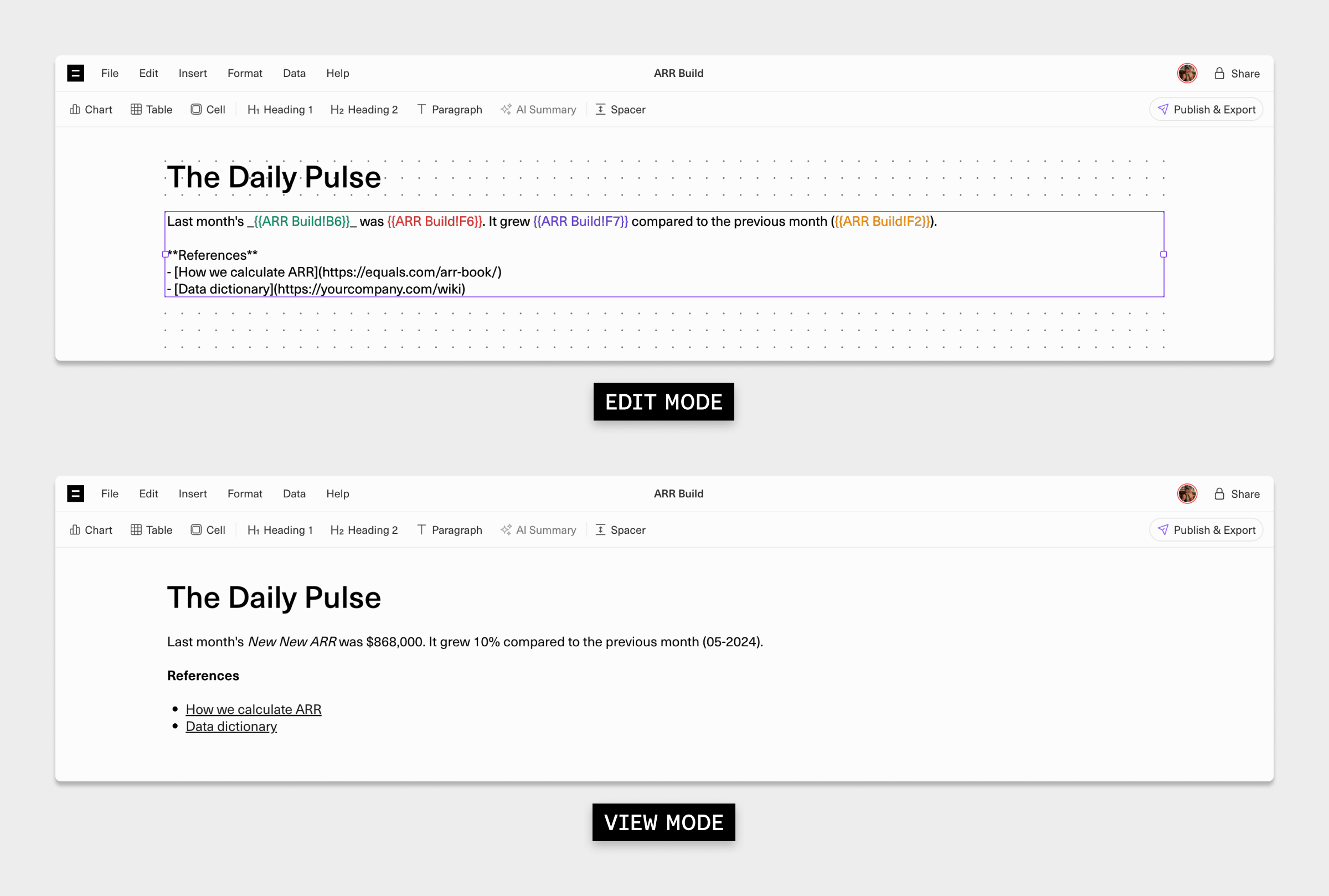
You can display the contents of a cell inline within a paragraph or heading on a dashboard by wrapping the cell reference in double curly brackets.
| Sheet name | Cell | Cell referenced in paragraph |
| ---------------- | ---- | ---------------------------- |
| Sheet 1 | C3 | `{{Sheet 1!C3}}` |
| Monthly Visitors | D22 | `{{Monthly Visitors!D22}}` |
Referencing cells inline is useful when you want to construct sentences like:
> Last month's Net New ARR was \$868,000. It grew up 10% compared to the previous month (05-2024).
In this example, `$12,500`, `10%`, and `05-2024` are all referenced cells dynamically calculated using formulas in a sheet called `ARR Build` .
| Cell | Cell contents | Calculated output | Cell referenced in paragraph |
| ---- | ---------------------- | ----------------- | ---------------------------- |
| B6 | `Net New ARR` | New New ARR | `{{ARR Build!B6}}` |
| F6 | `=SUM(F2:F5)` | \$868,000 | `{{ARR Build!F6}}` |
| F7 | `=(F6-E6)/E6` | 10% | `{{ARR Build!F7}}` |
| F2 | `=EOMONTH(TODAY(),-1)` | 05-2024 | `{{ARR Build!F2}}` |
If you put these all together when writing a sentence in your paragraph, it would appear like this in edit mode:
> Last month's `{{ARR Build!B6}}` was `{{ARR Build!F6}}`. It grew `{{ARR Build!F7}}` compared to the previous month `{{ARR Build!F2}}`.
***
[Create and edit dashboards](/docs/create-and-edit-dashboards)
[Dashboard filters](/docs/dashboard-filters)
## Supported Markdown
### Styling and linking text
| Markdown | Formatted text |
| ----------------------------------------------------------- | --------------------------------------------------------- |
| `**bold**` or `__bold__` | **bold** |
| `*italics*` or `_italics_` | *italics* |
| `[hyperlink to a great blog](https://wrap-text.equals.com)` | [hyperlink to a great blog](https://wrap-text.equals.com) |
### Lists
The Markdown to create bulleted and numbered lists is as follows:
```bash bash theme={null}
- Bullet one
- Bullet two
- Bullet three
```
```bash bash theme={null}
1. First list item
2. Second list item
3. Third list item
```
These would appear like so when viewing a dashboard:
**Bulleted List**
* Bullet one
* Bullet two
* Bullet three
**Numbered List**
1. First list item
2. Second list item
3. Third list item
## Referencing Cells
You can display the contents of a cell inline within a paragraph or heading on a dashboard by wrapping the cell reference in double curly brackets.
| Sheet name | Cell | Cell referenced in paragraph |
| ---------------- | ---- | ---------------------------- |
| Sheet 1 | C3 | `{{Sheet 1!C3}}` |
| Monthly Visitors | D22 | `{{Monthly Visitors!D22}}` |
Referencing cells inline is useful when you want to construct sentences like:
> Last month's Net New ARR was \$868,000. It grew up 10% compared to the previous month (05-2024).
In this example, `$12,500`, `10%`, and `05-2024` are all referenced cells dynamically calculated using formulas in a sheet called `ARR Build` .
| Cell | Cell contents | Calculated output | Cell referenced in paragraph |
| ---- | ---------------------- | ----------------- | ---------------------------- |
| B6 | `Net New ARR` | New New ARR | `{{ARR Build!B6}}` |
| F6 | `=SUM(F2:F5)` | \$868,000 | `{{ARR Build!F6}}` |
| F7 | `=(F6-E6)/E6` | 10% | `{{ARR Build!F7}}` |
| F2 | `=EOMONTH(TODAY(),-1)` | 05-2024 | `{{ARR Build!F2}}` |
If you put these all together when writing a sentence in your paragraph, it would appear like this in edit mode:
> Last month's `{{ARR Build!B6}}` was `{{ARR Build!F6}}`. It grew `{{ARR Build!F7}}` compared to the previous month `{{ARR Build!F2}}`.
***
[Create and edit dashboards](/docs/create-and-edit-dashboards)
[Dashboard filters](/docs/dashboard-filters)