> ## Documentation Index
> Fetch the complete documentation index at: https://docs.equals.com/llms.txt
> Use this file to discover all available pages before exploring further.
# Google Analytics
> Example Javascript code for importing data from Google Analytics
You can use Import Scripts to import data from your Google Analytics account directly into an Equals workbook.
# Create a service account
Start by going to [this page](https://console.cloud.google.com/projectselector2/apis/enableflow?apiid=analytics\&credential=client_key\&pli=1\&supportedpurview=project) and select the project you'd like to connect to. Once you select the project, enable the Google Analytics API by clicking *Next* and then *Enable*.
Then you’ll need to create a service account. To do so, you’ll need to click on the menu in the left hand corner and navigate to *APIs and Services* > *Credentials*.
On this screen, select *Manage Service Accounts* in the bottom left hand corner. Then select *Create Service Account*. Here you can give your account a name and click *Create and Continue*. You can continue through the two optional fields.
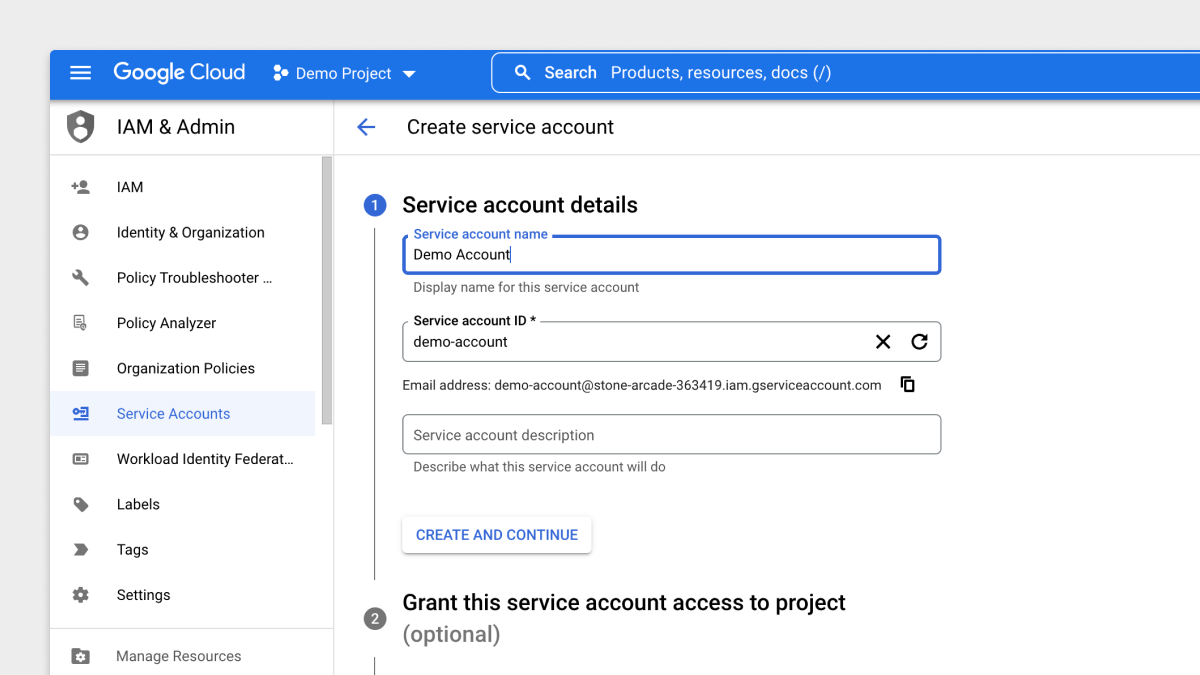 Now your service account has been created. Clicking into the listed account, you’ll want to select “Keys” from the toolbar at the top.
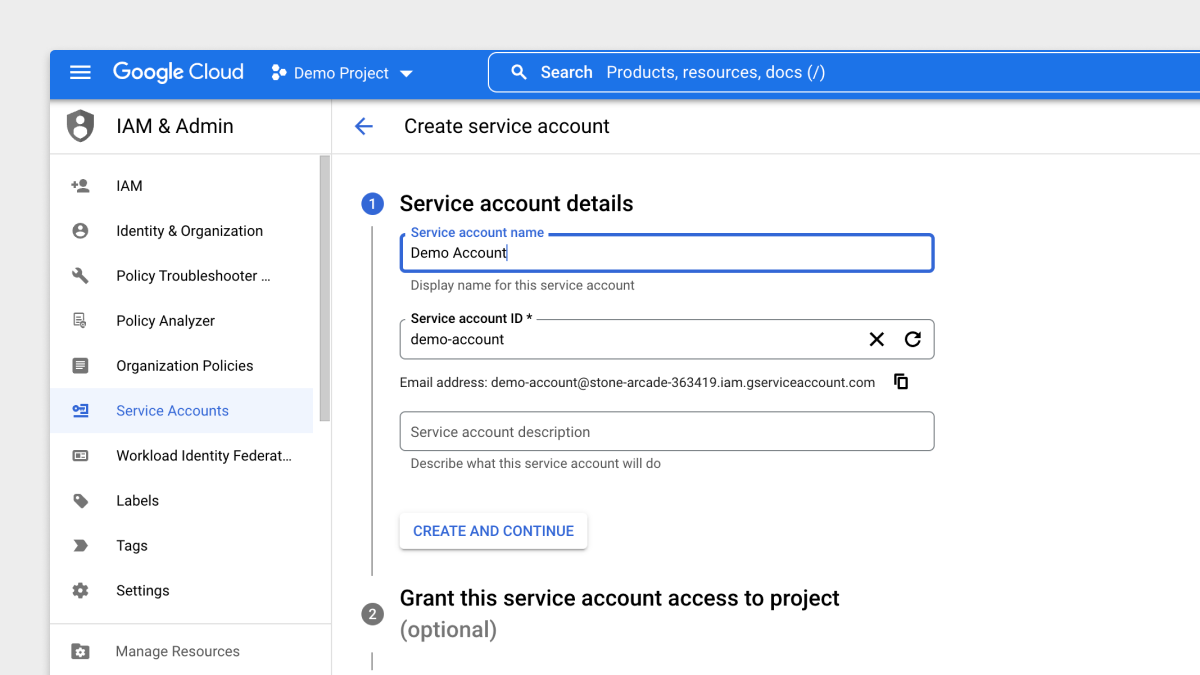 Click “Add Key” and “Create New Key” on the "Keys" page. You’ll want to make sure that the key you select is JSON. This will download a file on your computer.
# Add the key to a secret group
Open the JSON file from the step above in any text editor and copy the entire key to your clipboard. Then [create a new secret group](https://docs.equals.com/docs/secret-groups) and paste the entire JSON object in a key named `GA_KEY`.
# Example code
Once you've completed the prior steps, create a new workbook, add a new import script to a sheet and copy + paste the script below. Once pasted select your secret group in the toolbar (make sure the key in the secret group is called `GA_KEY`) and update your `PROPERTY_ID`.
## Google Analytics V4
Your Property ID can be found in Google Analytics: *Settings > Select your property > Property settings*. You will see the Property ID in the top right.
```
const equals = require("equals");
const axios = require("axios");
const crypto = require("crypto");
const gaKey = JSON.parse(equals.getSecret("GA_KEY"));
PROPERTY_ID = "123456789";
const formatDate = (gaDate) => {
const year = gaDate.slice(0,4);
const month = gaDate.slice(4,6);
const day = gaDate.slice(6);
return `${year}-${month}-${day}`
}
const unixTime = () => Math.floor(Date.now() / 1000);
const base64url = (obj, from64 = false) => {
const as64 = from64 ?
obj :
Buffer.from(JSON.stringify(obj)).toString('base64');
return as64
.replace(/=/g, '')
.replace(/\+/g, '-')
.replace(/\//g, '_');
}
const sign = (encodedHeader, encodedClaims) => {
const signer = crypto.createSign("RSA-SHA256");
signer.update(`${encodedHeader}.${encodedClaims}`);
const signature = signer.sign(gaKey.private_key, 'base64');
return base64url(signature, true);
}
const jwt = () => {
const now = unixTime();
const header = { alg: "RS256", typ: "JWT" };
const claims = {
iss: gaKey.client_email,
scope: "https://www.googleapis.com/auth/analytics.readonly",
aud: gaKey.token_uri,
exp: now + 3600,
iat: now,
};
const encodedHeader = base64url(header);
const encodedClaims = base64url(claims);
const signature = sign(encodedHeader, encodedClaims);
return `${encodedHeader}.${encodedClaims}.${signature}`;
}
const getAccessToken = async () => {
var bodyData = new URLSearchParams();
bodyData.append("grant_type", "urn:ietf:params:oauth:grant-type:jwt-bearer");
bodyData.append("assertion", jwt());
const resp = await axios({
method: "post",
url: gaKey.token_uri,
data: bodyData.toString()
});
return resp.data.access_token;
}
const getUniqueVisitors = async () => {
const accessToken = await getAccessToken();
const resp = await axios({
method: "post",
url: `https://analyticsdata.googleapis.com/v1beta/properties/${PROPERTY_ID}:runReport`,
data: {
dateRanges: [{
startDate: "2022-01-01",
endDate: "2022-06-01"
}],
metrics: [{
name: "Users",
expression: "totalUsers"
}],
dimensions:[{
name: "date"
}],
orderBys: [{
dimension: {
dimensionName: "date"
}
}]
},
headers: {
Authorization: `Bearer ${accessToken}`
}
})
return resp.data;
}
equals.addHeaders(["Date", "Unique visitors"])
const visitorData = await getUniqueVisitors();
for(const row of visitorData.rows) {
const date = formatDate(row.dimensionValues[0].value);
const value = row.metricValues[0].value;
equals.addRow([date, value])
}
```
***
[Github](/docs/github)
[Intercom](/docs/intercom)
Click “Add Key” and “Create New Key” on the "Keys" page. You’ll want to make sure that the key you select is JSON. This will download a file on your computer.
# Add the key to a secret group
Open the JSON file from the step above in any text editor and copy the entire key to your clipboard. Then [create a new secret group](https://docs.equals.com/docs/secret-groups) and paste the entire JSON object in a key named `GA_KEY`.
# Example code
Once you've completed the prior steps, create a new workbook, add a new import script to a sheet and copy + paste the script below. Once pasted select your secret group in the toolbar (make sure the key in the secret group is called `GA_KEY`) and update your `PROPERTY_ID`.
## Google Analytics V4
Your Property ID can be found in Google Analytics: *Settings > Select your property > Property settings*. You will see the Property ID in the top right.
```
const equals = require("equals");
const axios = require("axios");
const crypto = require("crypto");
const gaKey = JSON.parse(equals.getSecret("GA_KEY"));
PROPERTY_ID = "123456789";
const formatDate = (gaDate) => {
const year = gaDate.slice(0,4);
const month = gaDate.slice(4,6);
const day = gaDate.slice(6);
return `${year}-${month}-${day}`
}
const unixTime = () => Math.floor(Date.now() / 1000);
const base64url = (obj, from64 = false) => {
const as64 = from64 ?
obj :
Buffer.from(JSON.stringify(obj)).toString('base64');
return as64
.replace(/=/g, '')
.replace(/\+/g, '-')
.replace(/\//g, '_');
}
const sign = (encodedHeader, encodedClaims) => {
const signer = crypto.createSign("RSA-SHA256");
signer.update(`${encodedHeader}.${encodedClaims}`);
const signature = signer.sign(gaKey.private_key, 'base64');
return base64url(signature, true);
}
const jwt = () => {
const now = unixTime();
const header = { alg: "RS256", typ: "JWT" };
const claims = {
iss: gaKey.client_email,
scope: "https://www.googleapis.com/auth/analytics.readonly",
aud: gaKey.token_uri,
exp: now + 3600,
iat: now,
};
const encodedHeader = base64url(header);
const encodedClaims = base64url(claims);
const signature = sign(encodedHeader, encodedClaims);
return `${encodedHeader}.${encodedClaims}.${signature}`;
}
const getAccessToken = async () => {
var bodyData = new URLSearchParams();
bodyData.append("grant_type", "urn:ietf:params:oauth:grant-type:jwt-bearer");
bodyData.append("assertion", jwt());
const resp = await axios({
method: "post",
url: gaKey.token_uri,
data: bodyData.toString()
});
return resp.data.access_token;
}
const getUniqueVisitors = async () => {
const accessToken = await getAccessToken();
const resp = await axios({
method: "post",
url: `https://analyticsdata.googleapis.com/v1beta/properties/${PROPERTY_ID}:runReport`,
data: {
dateRanges: [{
startDate: "2022-01-01",
endDate: "2022-06-01"
}],
metrics: [{
name: "Users",
expression: "totalUsers"
}],
dimensions:[{
name: "date"
}],
orderBys: [{
dimension: {
dimensionName: "date"
}
}]
},
headers: {
Authorization: `Bearer ${accessToken}`
}
})
return resp.data;
}
equals.addHeaders(["Date", "Unique visitors"])
const visitorData = await getUniqueVisitors();
for(const row of visitorData.rows) {
const date = formatDate(row.dimensionValues[0].value);
const value = row.metricValues[0].value;
equals.addRow([date, value])
}
```
***
[Github](/docs/github)
[Intercom](/docs/intercom)